
Next step
Digital Signage Workflows
See how screen promotions, ad scheduling, and machine-side content management fit together.
See signage workflowsA vending screen can earn its keep in more than one way, but only if someone controls what appears on it, where it appears, and why it changes. Otherwise the screen becomes an expensive glowing rectangle with no commercial discipline behind it.
This guide explains where vending machine advertising software fits in a live deployment, what usually goes wrong first, and why what a machine screen is actually for tends to shape the next buying decision more than a glossy feature list ever will.
Use it when the conversation has moved beyond light research and someone now needs a practical brief they can carry into compatibility review, procurement, or rollout planning.
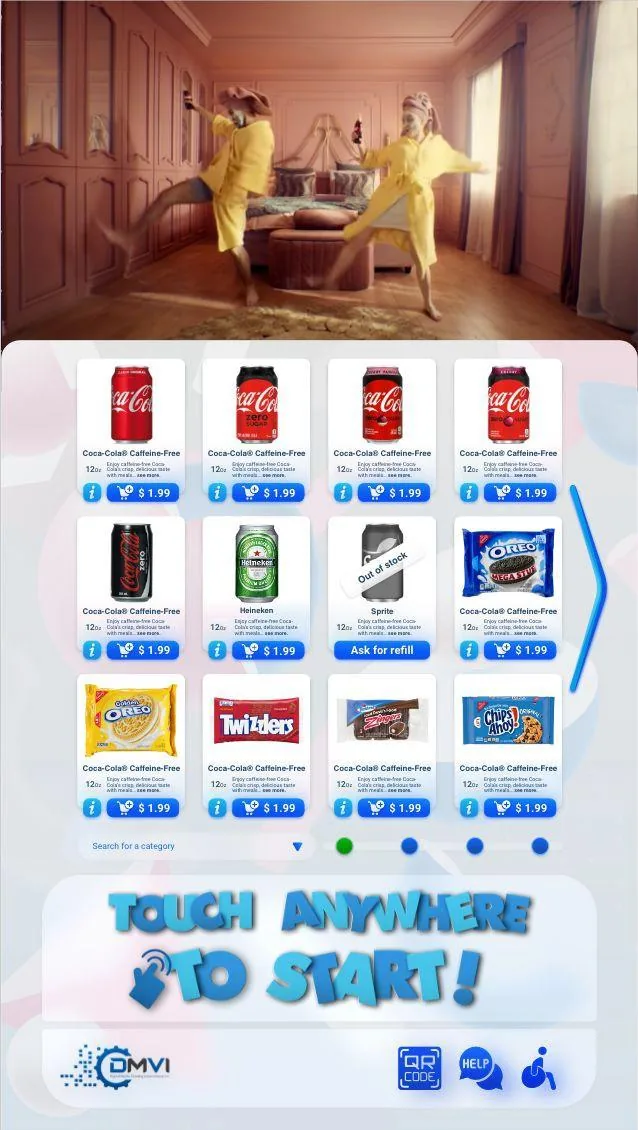
Digital signage and ad monetization on vending machine screens affects more than headline positioning. It changes rollout sequencing, workflow ownership, and which assumptions need to be confirmed before money or hardware is committed.
This guide walks through vending machine advertising software in operational terms, with particular attention to what a machine screen is actually for and the surrounding decisions buyers usually need answered before the project can move forward.
The goal is to give operations, procurement, compliance, and implementation stakeholders a shared working brief instead of leaving each team to infer the hard bits separately.
When the project is ready, the same questions can be carried directly into a scoped demo or compatibility review with the machine model, region, and deployment objective already defined.
The first strategic question in digital signage is not whether the machine has a screen. It is what the screen is supposed to do for the business. It may support promotions, brand storytelling, public information, QR payment guidance, sponsorships, or a more formal advertising model, and those are not the same commercial brief.
That distinction matters because the technical and operational stack changes with the objective. A screen used for brand and promo control can be managed very differently from a screen that is expected to deliver proof-of-play, campaign scheduling, and advertiser reporting.
On a vending machine, screen content lives dangerously close to the core buying journey. If the content distracts from browse, payment, pickup, or verification, the operator may end up harming the main transaction while congratulating themselves on having “engaging content”. That is not really a win.
The better approach is to treat signage as part of the machine experience. It should guide attention, reinforce promotions, improve clarity, or create a stronger branded environment without confusing the shopper about what to do next.
A vending screen becomes useful only when someone controls what appears on it, when it appears, and why it changes. If there is no clear content owner, no scheduling discipline, and no approval logic, the screen quickly becomes an expensive glowing rectangle with stale creative and no commercial purpose.
That is why content governance deserves a proper section in any serious signage discussion. Operators need to know who loads assets, who approves changes, how campaigns are targeted by machine or venue, and how old content is rotated before it goes cognitively invisible to customers.
Not every deployment needs a third-party ad server. Many only need central content control for promotions, education, or branded messaging. But if the business model includes sponsorships or external ad inventory, the buyer may need more than a simple CMS. Campaign scheduling, machine targeting, proof-of-play, and advertiser reporting start to matter much more in that scenario.
This is exactly the sort of distinction that should be resolved early. Otherwise buyers either overspend on infrastructure they do not need or underspec the system and discover later that the commercial model they imagined needs more operational tooling than a slideshow manager can provide.
The strongest measurement is outcome-based. Redemption, promo lift, basket mix changes, QR engagement, and clearer customer behaviour are much more persuasive than simply saying the machine had content running. Audience numbers and ad-revenue fantasies should be treated carefully unless the operator has a real sell-through model and evidence to support them.
That caution is healthy, not cynical. Machine screens can absolutely create value, but the value usually comes from controlled content tied to a clear business objective, not from vague claims that every digital surface automatically becomes a media asset.
The software should let operators schedule, target, update, and audit content without manual machine-by-machine chaos. It should also keep signage connected to the broader platform so branding, promotions, payment guidance, and machine experience still feel like one system instead of separate departments arguing through the touchscreen.
That is the operator-useful way to frame digital signage. Not as a random add-on, but as a managed screen capability that supports real workflow and commercial goals.
The video below shows the machine-side software in proper landscape format, giving buyers a cleaner view of the Android-based interface behind mixed-fleet monitoring, payments, and branded UI.
Most vending deployments succeed when the operator treats this topic as part of a wider operating model instead of a standalone feature request. That means machine compatibility, workflow ownership, reporting expectations, and rollout sequencing should all be reviewed together rather than in separate disconnected conversations.
Buyers also benefit from documenting what must be true on day one, what can be phased in later, and which assumptions still need confirmation from hardware, payment, or compliance stakeholders. That level of clarity shortens implementation cycles and prevents expensive rework after the machine is already live.
In practical terms, the strongest next step is usually a compatibility review or a scoped demo with the machine type, rollout geography, and business objective already defined. That gives DMVI enough context to answer the real question, not just the headline version of it.
Teams that document those answers early also make the project easier for procurement, operations, finance, and implementation partners to evaluate. Clear documentation becomes especially valuable when multiple vendors, venues, or regulators are involved because everyone can work from the same operating assumptions instead of inventing them as the project moves.
Use this checklist to pressure-test the deployment before money, hardware, or procurement time is committed.
Use the related pages below to move from research into the right product or deployment conversation.
It can include promotions, brand messaging, campaign creative, public-information content, or paid advertising served through the machine screen as part of the customer experience.
Because the value comes from managing what appears, when it appears, and how it changes over time. A screen without content discipline is just hardware spend pretending to be strategy.
No. Some only need internal campaign control or brand messaging. Others need more formal advertising workflows. The right answer depends on the commercial model behind the screen.
It usually sits alongside branding, promotions, machine UX, and in some cases hybrid fulfillment or retail workflows, so buyers should review it as part of the wider deployment rather than as an isolated add-on.
Test content scheduling, campaign changes, machine-level control, layout clarity, and whether the operator can manage messaging without creating constant manual work.
Yes. Many operators use it for brand control, internal campaigns, site-specific messaging, or customer guidance rather than external ad inventory.
Assuming the commercial idea is enough without defining who manages content, how campaigns change, and how the machine experience stays coherent while signage is active.
Most buyers next review the digital signage feature page or Theme Manager, because signage decisions are strongest when they are connected to the overall shopper-facing machine experience.
Move from research into the product, solution, or compatibility page that best matches the machine and deployment you are actually planning.