
Next step
Online Order Pickup
See how click and collect, ecommerce reservation, and vending-machine pickup fit into one buyer-friendly workflow.
Explore online order pickupClick-and-collect vending sounds simple until the pickup logic meets the real world. Someone has to decide when inventory is reserved, how the customer is notified, what happens if they arrive late, and whether the machine is dispensing, holding, or handing off the order in stages.
This guide explains where click and collect vending fits in a live deployment, what usually goes wrong first, and why what click-and-collect vending means in practical terms tends to shape the next buying decision more than a glossy feature list ever will.
Use it when the conversation has moved beyond light research and someone now needs a practical brief they can carry into compatibility review, procurement, or rollout planning.
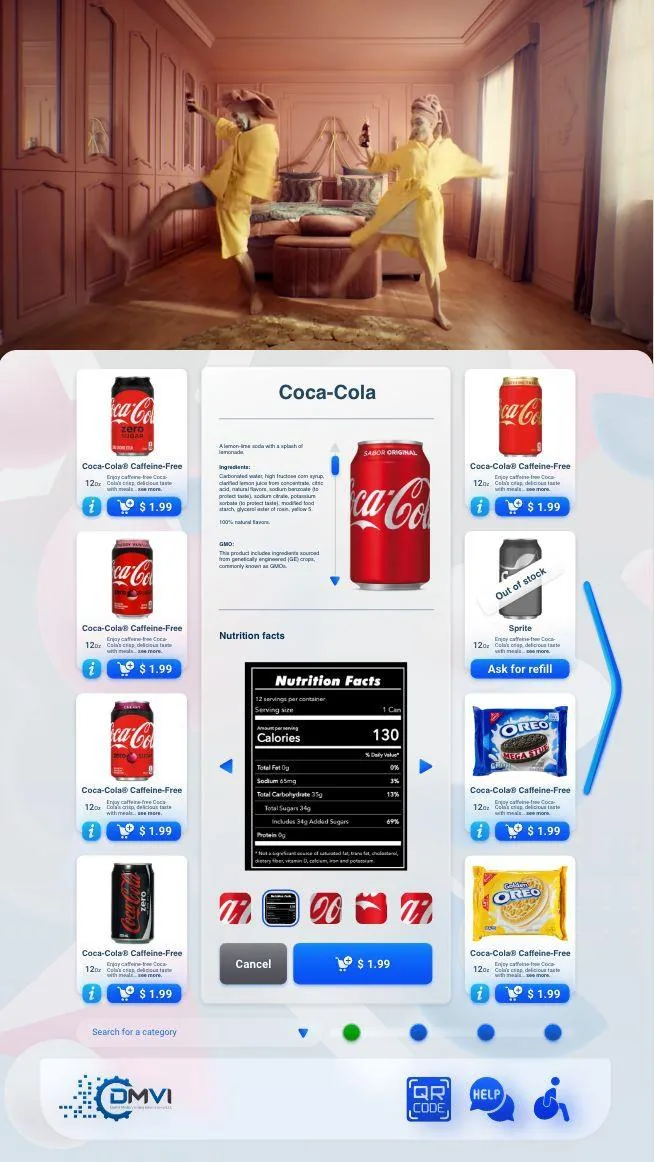
Click and collect vending for ecommerce and self-service pickup affects more than headline positioning. It changes rollout sequencing, workflow ownership, and which assumptions need to be confirmed before money or hardware is committed.
This guide walks through click and collect vending in operational terms, with particular attention to what click-and-collect vending means in practical terms and the surrounding decisions buyers usually need answered before the project can move forward.
The goal is to give operations, procurement, compliance, and implementation stakeholders a shared working brief instead of leaving each team to infer the hard bits separately.
When the project is ready, the same questions can be carried directly into a scoped demo or compatibility review with the machine model, region, and deployment objective already defined.
Click-and-collect vending is a vending-specific version of a broader buy-online, pick-up-later workflow. The customer starts the order in an ecommerce or remote-ordering channel, and the vending machine or related pickup endpoint becomes the controlled place where the order is released rather than simply sold from scratch at walk-up.
That sounds straightforward until the operational details show up. Someone still has to define reservation timing, customer notification, pickup authentication, expiry rules, and what happens if the order is late, incomplete, or physically impossible to collect in the expected way.
Retail language such as BOPIS, BOPIL, or click and collect is useful shorthand, but the operator problem is always the same: when should stock be reserved, who owns that inventory state, and how is the customer promise protected until collection happens. Reserve too late and orders get cancelled. Reserve too early and available stock gets trapped in dead holds.
This is why the best implementations are explicit about pickup windows, expiry rules, and restocking behaviour. The platform has to know when the product is committed, when it is still available, and when a missed collection returns it to sale without leaving the team guessing.
A standard vending cabinet, a refrigerated machine, and a locker wall can all support click-and-collect, but they do not support the same products or the same customer expectations. Product size, temperature control, security, and retrieval method all shape whether the endpoint feels elegant or painfully mismatched to the use case.
That is why hardware choice should follow the workflow rather than the other way around. A buyer who starts with a cabinet catalogue and only later remembers the pickup journey often discovers that the wrong endpoint makes the software problem much harder than it needed to be.
The customer who arrives to collect an order is not interested in your internal architecture. They want the machine to recognise the code, explain the next step, and release the right item with as little cognitive friction as possible. If the interface is unclear, even a technically correct workflow feels broken.
This is where code entry, QR scan, identity check, timeout messaging, and failed-collection handling all matter. Click-and-collect vending wins when the machine behaves like a confident, branded pickup point rather than a self-service puzzle.
When done properly, click-and-collect vending can extend pickup hours, reduce counter labour, and give ecommerce-style convenience without building a full staffed pickup desk in every location. It is especially attractive in hospitality, campus, office, and convenience settings where unattended handoff is commercially useful.
But the model still needs discipline. Staff may need to load orders, approve exceptions, or handle failed releases, and venue access may limit the promised convenience. Buyers should therefore judge the workflow by its operational honesty, not by the fantasy that all automation equals no labour.
Before scaling a click-and-collect programme, operators should prove that inventory sync, pickup windows, code or QR logic, support handling, and customer messaging all remain consistent under real order volume. They should also test whether the endpoint type is actually right for the products, not just impressive in a demo.
That is the sensible route into a wider deployment. Once those basics hold, the machine becomes a genuine extension of the order journey. If they do not, the lesson is still valuable because it points to exactly where the workflow needs to change before it is trusted at scale.
Most vending deployments succeed when the operator treats this topic as part of a wider operating model instead of a standalone feature request. That means machine compatibility, workflow ownership, reporting expectations, and rollout sequencing should all be reviewed together rather than in separate disconnected conversations.
Buyers also benefit from documenting what must be true on day one, what can be phased in later, and which assumptions still need confirmation from hardware, payment, or compliance stakeholders. That level of clarity shortens implementation cycles and prevents expensive rework after the machine is already live.
In practical terms, the strongest next step is usually a compatibility review or a scoped demo with the machine type, rollout geography, and business objective already defined. That gives DMVI enough context to answer the real question, not just the headline version of it.
Teams that document those answers early also make the project easier for procurement, operations, finance, and implementation partners to evaluate. Clear documentation becomes especially valuable when multiple vendors, venues, or regulators are involved because everyone can work from the same operating assumptions instead of inventing them as the project moves.
Use this checklist to pressure-test the deployment before money, hardware, or procurement time is committed.
Use the related pages below to move from research into the right product or deployment conversation.
Click-and-collect vending uses the machine as part of the pickup experience, so reservation, release, and customer confirmation have to work through the cabinet rather than through a simple staffed collection counter.
That depends on the business rules, but it has to be defined clearly. If reservation timing is fuzzy, the operator risks overselling stock or disappointing the customer at pickup.
That should be handled by policy and software logic before launch. The workflow needs a rule for late collection, expired holds, and when inventory is returned to sale.
Not in every case, but the machine still needs a clean way to guide pickup, confirm the order state, and avoid confusing the customer at the moment of collection.
Yes. The same operating logic can support other pickup workflows where pre-ordering, reservation, and controlled release create a better customer experience than a purely walk-up sale.
Test order reservation, pickup timing, message delivery, failed collection handling, and what the machine shows when the order has changed or is not ready.
It gives the operator a machine-side workflow, monitoring layer, and broader platform context so pickup logic does not sit in isolation from the rest of the deployment.
Most buyers move next into the broader hybrid fulfillment page or into compatibility review if they already know the machine path they want to evaluate.
Move from research into the product, solution, or compatibility page that best matches the machine and deployment you are actually planning.